Mastering Complex Line Work with Multi Lines Brushes for Procreate
In the rapidly evolving landscape of digital illustration, efficiency and stylistic consistency are paramount. Artists, designers, and hobbyists constantly seek tools that bridge the gap between technical precision and organic creativity. One such innovation transforming the workflow on iOS devices is the specialized category of Multi Lines Brushes for Procreate. These tools represent a significant leap forward for creators who rely on repetitive linear patterns, offering a streamlined approach to generating complex geometric and decorative elements without the tedium of manual duplication.
The core appeal of these brushes lies in their ability to produce multiple parallel strokes from a single gesture. This functionality is not merely a convenience; it is a fundamental shift in how line art, hatching, and pattern design are approached on the iPad. By consolidating what was once a multi-step process into a singular motion, artists can maintain the fluidity of their hand movement while achieving results that would otherwise require meticulous layer management or vector-based manipulation.
The Mechanics of Parallel Stroke Generation
Understanding the utility of Multi Lines Brushes for Procreate requires an appreciation of the underlying mechanics. Traditional digital painting involves laying down one stroke at a time. If an artist needs three parallel lines, they must draw the first, adjust their position, and draw the second, ensuring consistent spacing and pressure throughout. This method is prone to human error, resulting in uneven gaps or varying line weights that disrupt visual harmony.
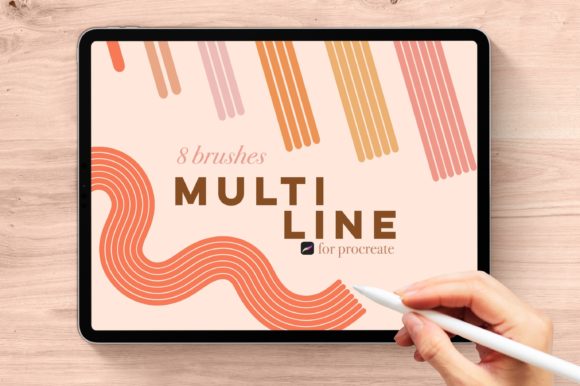
In contrast, this specific brush set utilizes advanced scripting within the Procreate engine to render multiple monoline strokes simultaneously. The bundle includes a comprehensive range of options, specifically tailored to different density requirements. The collection features:
- SADIE: A foundational 1-line brush for standard sketching and outlining.
- DANA: Produces 2 parallel lines, ideal for simple borders or double-exposure effects.
- TAYLOR: Generates 3 lines, perfect for basic hatching and shading textures.
- OLIVIA: Creates 4 lines, offering denser texture for mid-tone values.
- KYRA: Renders 5 lines, suitable for intricate pattern fills.
- ELIZA: Produces 6 lines, providing a rich, woven appearance for detailed backgrounds.
- BROOKE: The most dense option with 7 lines, creating near-solid tonal blocks with visible linear texture.
This gradient of complexity allows users to select the exact level of detail required for their project. Whether creating a subtle shadow using the TAYLOR brush or filling a large background area with the BROOKE brush, the control remains intuitive. The monoline nature of these tools ensures that every line within the group maintains uniform weight, regardless of the speed or pressure of the stylus, which is crucial for maintaining a clean, professional aesthetic.
Practical Applications Across Creative Disciplines
The versatility of Multi Lines Brushes for Procreate extends far beyond simple line art. Professionals across various industries have found unique ways to integrate these tools into their daily workflows. For graphic designers, the ability to quickly generate consistent parallel lines is invaluable for creating retro-inspired posters, ticket designs, or coupon layouts where guilloché patterns are common. Instead of relying on static assets, designers can draw custom shapes filled with dynamic linear textures that respond to the curvature of their hand-drawn paths.
Illustrators and comic artists benefit significantly from the hatching capabilities. Traditional cross-hatching is a time-consuming technique used to create value and depth. With brushes like OLIVIA or KYRA, artists can lay down base shadows rapidly. The consistent spacing ensures that the shading looks deliberate and controlled, avoiding the messy appearance that often plagues freehand hatching attempts. This is particularly useful in black-and-white comics or editorial illustrations where tone must be conveyed without color.
Fashion designers and textile creators also find immense value in this toolset. Sketching fabric folds, pleats, and stripes becomes exponentially faster. A dress sketch that might take twenty minutes to shade with individual lines can be completed in a fraction of the time using the 5 or 6-line variants. The result is a professional-looking technical flat or concept sketch that communicates texture and form clearly to clients or manufacturing teams.
Architectural and Technical Visualization
In architectural visualization and interior design sketching, consistency is key. When rendering materials like wood grain, siding, or tiled surfaces, the Multi Lines Brushes for Procreate provide a quick way to suggest texture without getting bogged down in photorealistic detail. The DANA or TAYLOR brushes can effectively mimic the look of paneling or flooring, allowing architects to focus on perspective and lighting rather than repetitive texturing tasks.
The Unique Advantage of the BETH Bonus Brush
While the standard monoline brushes offer exceptional utility, the inclusion of the BETH bonus brush introduces a layer of interactive complexity. Similar in structure to the ELIZA 6-line brush, BETH possesses color-changing capabilities. This feature allows the lines to shift hue or saturation based on input, adding a dynamic, almost iridescent quality to the artwork. It transforms static line work into something more vibrant and engaging, suitable for psychedelic art, abstract compositions, or highlighting specific focal points in a design.
However, it is critical to note the hardware requirements for this specific feature. The BETH brush relies on advanced pressure and tilt data that is only accessible through specific Apple hardware. Consequently, this bonus brush only works with an Apple Pencil or an iPhone equipped with 3D Touch. Users attempting to utilize this feature on older devices or without compatible styluses will not experience the color-shifting effect, though the standard multi-line functionality of the other brushes remains unaffected by these hardware constraints.
Technical Compatibility and System Requirements
Before integrating these tools into a creative pipeline, it is essential to understand the technical environment. IMPORTANT: These brushes are only compatible with the Procreate app for iOS devices. They will not work with other applications or software such as Adobe Fresco, Clip Studio Paint, or desktop-based programs like Photoshop or Illustrator. This exclusivity is due to the proprietary brush engine format used by Procreate, which allows for deep customization and performance optimization on iPadOS.
Users must ensure they are running a recent version of Procreate to guarantee full compatibility. While the brushes are designed to be lightweight, the simultaneous rendering of up to seven lines can demand more processing power than standard brushes. Therefore, using them on newer iPad models with robust processors will yield the smoothest experience, particularly when working on large canvases with high resolutions. For hobbyists using older iPad generations, it may be advisable to limit canvas size or layer count to maintain responsive performance.
Enhancing Workflow Efficiency and Creative Flow
The primary benefit of adopting Multi Lines Brushes for Procreate is the preservation of creative flow. Interruptions in the artistic process, such as adjusting settings, copying layers, or correcting uneven spacing, can break concentration and diminish the quality of the final piece. By automating the generation of parallel lines, these brushes allow the artist to remain in a state of flow, focusing on composition, form, and expression rather than mechanical repetition.
Furthermore, the non-destructive nature of digital art means that these brushes can be experimented with freely. An artist can try the KYRA 5-line brush for a shadow, decide it is too dense, and simply switch to TAYLOR without erasing or undoing multiple steps. This flexibility encourages experimentation and helps creators discover new stylistic signatures. The ability to toggle between different line densities instantly empowers artists to make real-time decisions about weight and balance in their compositions.
Educational and Hobbyist Use Cases
For educators teaching digital art fundamentals, these brushes serve as excellent tools for demonstrating concepts of value, texture, and pattern. Students can quickly see the impact of line density on perceived darkness, helping them grasp theoretical concepts through practical application. Hobbyists, meanwhile, can elevate their journaling, doodling, and casual sketching with professional-grade textures that were previously difficult to achieve without years of practice.
In conclusion, the integration of Multi Lines Brushes for Procreate into a digital artist's toolkit offers a compelling blend of efficiency, precision, and creative potential. From the single-line clarity of SADIE to the complex, color-shifting dynamics of BETH, this bundle addresses a wide array of artistic needs. By understanding the specific capabilities and hardware requirements, creators can leverage these tools to enhance their productivity and expand their visual vocabulary, ensuring that their digital workflow is both robust and inspiring.