Integrating the Laser Cut Stationery Organizer SVG File into Your Creative Workflow
In the realm of modern crafting and small-scale manufacturing, efficiency is not just a buzzword; it is the difference between a hobby that stalls and a business that scales. For professionals, educators, and entrepreneurs looking to optimize their workspace or product line, the Laser Cut Stationery Organizer SVG File represents more than just a digital download. It is a foundational asset designed to streamline production, reduce material waste, and ensure consistent quality across multiple projects. This specific design, optimized for 6 mm material thickness, serves as a practical solution for those who value precision and functionality in their daily operations.
Understanding where this file fits into a broader process begins with recognizing the shift from manual prototyping to digital fabrication. Whether you are a freelancer managing a home office, a teacher organizing classroom supplies, or a small business owner creating inventory for an online store, the preparation phase is critical. The Laser Cut Stationery Organizer SVG File eliminates the need to draft complex geometries from scratch. Instead of spending hours calculating joinery tolerances or sketching slot dimensions, you start with a verified blueprint. This allows you to focus your energy on material selection, finishing techniques, and the strategic deployment of the final product within your workflow.
Pre-Production Planning and Material Compatibility
Before any machine powers up, successful implementation requires a thorough assessment of materials and machine capabilities. The defining feature of this organizer design is its optimization for 6 mm material thickness. This specification is crucial because laser cutting relies on precise kerf compensation—the amount of material burned away by the laser beam. If the slot width in the design does not match the material thickness, the resulting assembly will either be too loose to hold its shape or too tight to assemble without breaking the joints.
When integrating this file into your project pipeline, consider the following material variables:
- Wood and Plywood: Birch plywood is a popular choice for its strength and clean edges. Ensure the ply count matches the 6 mm requirement to avoid voids in the layers that could weaken the structure.
- Acrylic: Cast acrylic offers a sleek, professional look suitable for high-end desk accessories. However, it behaves differently under the laser than wood, often requiring adjusted power and speed settings to prevent melting.
- MDF and Hardboard: These are cost-effective options for prototyping or painting projects, but they produce more dust and require proper ventilation during the cutting process.
The included file formats—AI, EPS, SVG, DXF, and PNG—ensure that regardless of your preferred software ecosystem, compatibility is seamless. If you use Adobe Illustrator for vector editing, the AI or EPS files allow for direct manipulation of anchor points. For users operating within the Silhouette or Cricut ecosystems, the SVG format is ideal. CNC machinists or those using industrial laser software like LightBurn will find the DXF format robust for toolpath generation. This versatility means the asset can move fluidly between different stages of a business workflow, from initial concept testing to final mass production.
Execution: From Digital File to Physical Asset
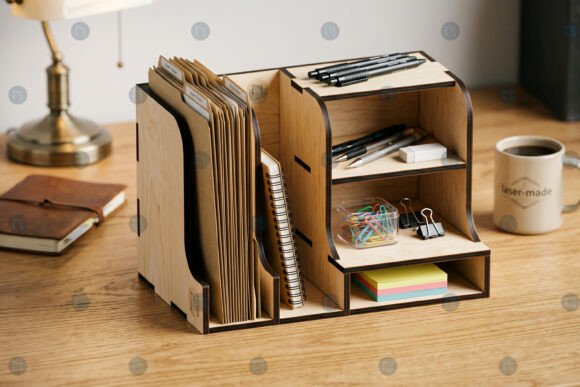
Once the material is selected and the file imported into your cutting software, the execution phase begins. A realistic 3D mockup style preview often accompanies these files, providing a visual reference for the final assembly. However, translating that image into a physical object requires attention to machine calibration. Before running a full sheet of expensive material, it is standard practice to perform a "power test" on a scrap piece of the same 6 mm stock. This step verifies that the laser settings create a clean cut without excessive charring, which is particularly important for visible edges in a stationery organizer.
During the cutting process, organization is key. As pieces are cut, they should be sorted logically to facilitate rapid assembly. The design typically features interlocking tabs and slots that rely on friction fit. If you are producing these organizers for sale or as part of a kit, consider labeling parts or grouping them by sub-assembly. This reduces the cognitive load during the packing or building phase, ensuring consistency across units. For educators using this in a classroom setting, pre-sorting kits allows students to focus on the assembly logic rather than hunting for specific components.
Furthermore, the layered nature of the design allows for customization. While the structural integrity depends on the 6 mm specification, the aesthetic layers can be adapted. You might choose to stain specific tiers, apply vinyl decals to the side panels, or engrave logos onto the base. This flexibility makes the Laser Cut Stationery Organizer SVG File a versatile template for branding. A marketing agency could produce branded desk sets for clients, while a blogger might create unique backdrops for content creation, adding a personal touch that resonates with their audience.
Post-Production and Long-Term Utility
The value of this asset extends well beyond the moment the laser finishes its job. In a professional context, the finished organizer serves as a tool for maintaining order and enhancing productivity. For writers and developers, having a dedicated space for pens, drives, and notes reduces desk clutter, which correlates with improved focus. For small business owners, these organizers can be sold as standalone products or bundled with other stationery items to increase average order value.
Quality control is an essential part of the post-production workflow. Inspect each unit for loose joints or burn marks that detract from the finish. Sanding edges lightly can improve the tactile experience, especially for wooden versions. If the organizer is intended for heavy daily use, applying a sealant or varnish can protect the material from moisture and wear, extending the product's lifespan. This attention to detail reinforces the perception of quality, whether the item is for personal use or customer delivery.
Moreover, the digital nature of the file supports iterative improvement. If you discover that a specific slot is too tight for a certain brand of pen, you can open the source file (AI or SVG), adjust the vector path by a fraction of a millimeter, and save a new version. This ability to tweak and refine ensures that the tool evolves alongside your needs. It transforms a static purchase into a dynamic resource that grows with your skills and requirements.
Strategic Integration for Various Users
Different users will integrate this file into their routines in distinct ways:
- Entrepreneurs and Makers: Use the file to rapidly prototype new product lines. The standardized 6 mm design allows for quick scaling from a single unit to a batch of fifty without redesigning the core mechanics.
- Educators and Workshop Leaders: Incorporate the project into STEM or art curricula. It teaches students about vector design, material properties, and spatial reasoning through hands-on assembly.
- Interior Designers and Home Organizers: Utilize the organizer as a custom element in client projects. By matching the wood species or acrylic color to existing décor, you create bespoke solutions that off-the-shelf plastic organizers cannot match.
- Corporate Gift Planners: Customize the files with company logos before cutting to create high-value, useful gifts that reinforce brand identity daily.
Ultimately, the Laser Cut Stationery Organizer SVG File is a bridge between digital intent and physical utility. It removes the barrier of complex engineering, allowing creators to focus on execution and application. By understanding the material constraints, leveraging the multi-format compatibility, and adhering to a disciplined production workflow, you can maximize the return on this digital investment. Whether the goal is to declutter a personal workspace or launch a new revenue stream, this tool provides the structural foundation necessary for success.
As you move forward with your projects, remember that the true power of such assets lies in their adaptability. Do not hesitate to experiment with finishes, combine multiple units for larger storage systems, or modify the design to suit niche requirements. The transition from a downloaded SVG to a functional, tangible object is where creativity meets practicality, resulting in outcomes that are both aesthetically pleasing and highly efficient.